
dev log 2
- The last 30-day devlog was fun, but my main goal there was not being consistent every day but to get to day 30 and learn 30 new things. This time I want to take it a notch up by trying to be consistent for 30 days and also learn newer things over next 30 days.
Jump to: Day 1 | Day 2 | Day 3 | Day 4 | Day 5 | Day 6 | Day 7 | Day 8| Day 9 | Day 10 | Day 11 | Day 12 | Day 13 | Day 14 | Day 15 | Day 16 | Day 17 | Day 18 | Day 19 | Day 20 | Day 21 | Day 22 | Day 23 | Day 24| Day 25 | Day 26 | Day 27 | Day 28 | Day 29 | Day 30
day 1:
learning about frontend web performance was sitting in my to learn list for a very long time and I do have my personal site up and running with content constantly added into it so I started to learn how to improve my static site performance to. got to know about unlighthouse (lighthouse for your entire site) ran that to see our baseline lighthouse performance is roughly about 80%

To do any of these I need to learn the bits and bytes of web performance, so I started off with understanding HTML performance considerations like ETAG, last-modified, max-age=n, Brotli compression over gzip, and static and dynamic compression. I also learnt about the critical path as well as understanding render blocking vs parser blocking.
day 2:
Today I spent roughly 6 hours continuing to go deeper into frontend web performance exactly where I left yesterday. Learned about how to optimize resource loading (HTML, CSS, JS), what are the problematic CSS syntaxes and why it is problematic, how JavaScript works when a request is sent, as well as how to prevent parser blocking. Got to know about various resource hints like preconnect, prefetch, dns-prefetch, and fetch priority tags. Got to know about image and video optimization techniques and how they affect the Cumulative Layout Shift (CLS) metric and load time. I figured out image optimization just via common sense because data is travelling via the network so smaller image size = better, but at the same time got to know about the AVIF format. Next, I tried to understand how to optimize web fonts (woff2). I used to write font-display: block for years but today is when I went ahead and learned what it does as well as various other font-display values like swap, fallback, optional, etc. The final big learning for the day was getting comfortable reading flame graphs. Today was the first day I opened a tab other than the network tab, and the Chrome DevTools performance tab is incredibly good. At first it felt intimidating, but after going through all the basics from yesterday I was able to read the flame graph and point out what’s going on. Fortunately, I have this very simple website to understand its flame graph and try to optimize (that’s for tomorrow), but after reading the flame graph I can now clearly see what parts need to be optimized in this blog to still improve its performance. Unlike other static sites, I just can’t directly change the code because my whole website is generated through my very own markdown-to-HTML engine and I have to figure out a way to make sure the engine does most of the optimizations that I am planning to do. So tomorrow is going to be interesting.
some of the resources that I used today to learn:
https://developer.chrome.com/docs/devtools/performance/reference https://nitropack.io/blog/chrome-devtools-performance-tab/ https://calendar.perfplanet.com/2025/chrome-devtools-for-debugging-web-performance/ https://www.debugbear.com/blog/fix-web-performance-devtools

day 3:
Today I spent my time on image optimization. Wrote a new module in my markdown parser to now convert source images in my markdowm files into WebP, also adding the ability to resize images.
 "image": {
    "enabled": true,
    "outputFormat": "webp",
    "backupOriginalFormat": true,
    "quality": { "webp": 82 },
    "presets": {
      "banner":  { "width": 1600, "breakpoints": [480, 800, 1200, 1600], "loading": "eager", "fetchpriority": "high", "sizes": "100vw" },
      "content": { "width": 800,  "breakpoints": [400, 800],             "loading": "lazy",  "fetchpriority": "auto", "sizes": "(max-width: 800px) 100vw, 800px" }
    }
  }
Added this new configuration where you can specify the output image format. backupOriginalFormat: true will back up the source image so if you use a newer format like AVIF in a legacy browser that won’t support it, it will fall back to the good old JPEG or PNG. You can also configure the image quality for compression. The presets part was slightly difficult to figure out on most pages of my website I have a banner image which is some random manga panel or meme, and then there are other content images. The banner can be optimized differently by prefetching since it’s what users see in their initial viewport, while content images can be lazy-loaded at a smaller size, etc (thanks to the yesterday readings!). So I created presets and you can wire them up as part of the frontmatter. This also helps reduce the CLS score.

Also, there can be cases where individual images need to be resized, so I added a query param-style option to resize individual images as well. For example,  will have a width of 400 after rendering as HTML. Also did setup a cache to not convert images again and again. It was fun to again go back file level cache where I SHA’d the source file along with the format and size and wrote it into a file so if the SHA matches we skip. This was all I was able to do today. Tomorrow I need to refine the engine to handle all possible edge cases.
Day 4:
After 3 days of grinding my way through understanding frontend web performance, I finally put all of it to. Here are a few of the optimizations I made. In the flame graph I noticed that CSS is render-blocking, so the first step was to preload it (since it’s the same origin). Also removed most of the unused CSS and minified it, since it has to traverse the network,minifying not just removes unwanted spaces,if combines similar syntaxes and make it easy to create the css dom tree. I had Google Analytics set up in my blog and had never logged into it since the day of setup, so I completely removed that JavaScript (I could have deferred it, but it felt wasteful). Next up was images I converted all images to WebP (now hanamark does it automatically), gave images a fixed width and dimensions for the CLS score. Applied 82% image compression, which felt like a sweet spot. Cloudflare caching enabled and cached static assets like the favicon, etc. For fixed images like the RSS icon I swapped in SVG instead of PNG. Aggressively cached predictable images. Played around with fetchpriority: if it’s the first image or a banner image on the viewport I set fetch-priority to high and don’t lazy-load it. To do this I added a fetchpriority query param which gives me fine-grained fetch priority control. 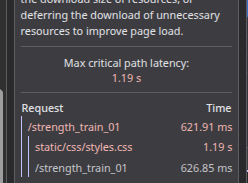
The most difficult problem for me was request chaining. Google specifically asks us to avoid chaining of requests
but for some weird reason the page kept chaining again and again.
In the image above I can see there is a CSS chain, and I could also see the same link /strength_train_01 chaining again. This recursively happens 2-3 times. Upon digging deeper I found out it’s due to the hosting vendor in my case Cloudflare. An apex domain must map to a static IP address (an A or AAAA record) and cannot point directly to another domain name via a CNAME record. Modern DNS providers like Cloudflare bypass this using a feature called CNAME Flattening, which maps the apex domain dynamically to a target destination by themself. To a web server or hosting platform, thisisvoid.in and www.thisisvoid.in are entirely different entities. If your hosting provider (like Cloudflare Pages) is configured to only listen for traffic sent to the www subdomain, anyone typing just the apex domain into their browser will usually trigger an error or get dropped but Cloudflare adds an explicit server-side redirect rule that maps apex requests to the www address, so that’s the first hop. The browser arrives at the www version, but Cloudflare Pages has a rule to strip .html from all URLs to make them “clean.” (I had .html) Cloudflare issues a 308 Redirect, telling the browser to drop the extension. The browser then redirects to https://www.thisisvoid.in/2026_01/updates_01 — that’s the second hop. If we can handle both redirects ourselves, we can cut down 2 additional round trips. That’s exactly what I did. So after doing all of that…
before:

after:

Shaved almost 4 seconds on average. There is still room to improve, but that’s for another time.
Ive been wanting to do leetcode for a while now and finally logged into leetcode today. today’s daily challange was a modified bellman ford breath first search algo problem took me a hour to solve it. terrible because 4-5 years back the same problem I would have solved within 10 min:( indeed you lose your skills. funnily I dont know tuple exists in c++ (I dont remember the syntax)
tuple<int,int,int>a;
what I did is funny and stupid but it works lmaoooo
pair<pair<int,int>,int>a;
will eventually improve and move back to codeforces.
Day 5:
Today is a day of regret. I did 4 LeetCode-style medium questions to check my borderline skill set and damn bro, my algo skills are washed out. It’s been a 3-4 year gap since my prime competitive programming days and I am pathetic now. It takes 40-45 minutes for me to solve them on my own, and taking 25 minutes for a linked list medium-hard question today is beyond pathetic. Comparison is the thief of joy, but comparing my prime self with this version of me is humiliating. I am amazed at how I used to be a Candidate Master on Codeforces coz the difference is nights and days. Now I have 2 problems. One is my C++ skills I don’t use C++ every day and the last time I used it was when I participated in ICPC regionals in 2022. I have forgotten a lot of C++ syntax but I don’t want to do DSA in any other language because since I am so used to solving in c++ I feel muscle memory will kick in over the next few weeks and I will start remembering nuances. My main idea was to solve some random problems before starting Advanced Algorithms by ITMO University, Russia by Pavel Mavrin, but now I will improve my baseline through this month and then start that playlist once I am confident. Need to put more effort and time into this.
Day 6:
I have had this problem for a very long time my personal observability setup is not so great. My current process is: I use the built-in logger in whatever language I’m writing in and log the data to a log file, stitch the time-series log files together myself, zstd compress them and dump them into my object store. Whenever I have an issue I manually download the logs from the object store, decompress them, open them in VSCode, and search through them like a caveman. Also, for machine-level metrics I run a systemd timer to keep collecting them as time-series data and again dump them in the object store. My logging is also not uniform or fine-grained (I don’t do traces or spans most of the time). Only in the most critical cases I spin up grafana dashboards. It just works for me, but I understand that life would be a lot easier if I get myself OTEL-pilled. Thats what I started to do today.
Day 7:
Today was not a very productive Sunday. Spent a lot of time understanding the components of OTEL and how and why it is built coz without knowing the how and why, it’s difficult for me to truly understand any tooling. Also looked into a high-level overview of OTLP and what an OTEL collector is (it absolutely made sense why there is a collector in OTEL). Then I started looking into Prometheus and how Prometheus and OTEL share a few pieces but are at the same time completely different metric tooling. Tomorrow I need to solidify metric primitives like gauge, count, etc. and go through PromQL. Finally, did the initial Prometheus setup and tried scraping Prometheus’s own metrics.
Day 8
A new pattern of thinking I have unlocked is figuring out the time complexity of an STL or built-in function via “what would the time complexity be if I designed it?” If I can reason about that, then they would have likely implemented it similarly. If I cannot figure out how it is designed, or if it is more optimal than what I could come up with, then I straight away Google how it is designed from the C++ spec. This is a fun excersise. I was in a good mood for algo puzzle solving today so I spent 3 hours straight without a break to solve algo challenges. Still slow, but slightly better.
Day 9
Had a lot of grunt work and soft skill work to do which has been eating up all my time over the last 3 days. Today I spent time learning about Prometheus metric terminology like Prometheus data models (metric names, metric labels, sampling) and the usual metric types like count, gauge, histograms, etc. Also did some problem solving. Now I have a decent understanding, so tomorrow I need to code these things up and see how OTEL and Prometheus can be intertwined.
Day 10
Major power outage in my area so I spent only about 3 hours today. Started my day by looking into the anatomy of PromQL and the PromQL cheatsheet. Thanks to this cheatsheet I was able to clearly see everything you can do with a PromQL query, which made it easy to quickly glance through. Now that I had gone through all the concepts in Prometheus, it was time for a step-by-step implementation. Started with understanding how data scraping works in Prometheus and what the best production practices are to set one up. Also figured out how to dynamically configure targets (EC2 or any endpoints) upon autoscaling that is assume you scale a virtual machine, a container, or a k8s cluster: you need to dynamically start fetching metrics from the newly scaled machine and vice versa, which shouldn’t be handled manually. One great resource to understand scrape targets is this. After understanding scrape targets I scraped the Prometheus container internal metrics.


Day 11
Learned about cardinality in set theory and how it affects the performance of Prometheus. Tomorrow is Saturday, since it’s a holiday I’ll be free throughout the day, so I planned out what I need to read and build. I didn’t plan my day and wanted it to unfold by itself, which is a bad idea for me. I keep circling around random stuff and get caught deep in rabbit holes. I need to set a rough daily target and try hitting it. Overall a very slow day.
Day 12
Say hi to Grafana! Now that I am able to scrape metrics via Prometheus, the next step is to visualize them. Went ahead and set up Grafana locally and created a small fake application to wire everything together. The Grafana docs are really good. As a bonus I had time to explore Loki, which is a log aggregator (similar to the ELK stack, but lighter Loki only indexes labels, not the full log content). Since Loki is also made by Grafana Labs, the integration with Grafana is native and first-class, so I was abel to visualize log patterns right alongside your metrics.


Day 13
I’ve been jumping around like a monkey for the past few days outdoors playing as many sports as possible, so I’m slightly sore and lazy today. Today I helped one of my friends who is a UX designer and small business owner set up their payment gateway. They have a unique situation where they already have a Framer static website in place and needed a simple payment gateway for 2 of their plans with no sign-in required. Their flow is: customers click the payment button on the website, make a recurring payment, then phone the owner who cross-checks and handles all the manual work on their end. They get only 10-20 paying customers a week as of now. You can’t just generate a static Razorpay link and add it as an href in Framer because recurring payments work differently from one-time payments. With a one-time payment, a static Razorpay Payment Link works fine anyone who clicks it pays once and done. But for autopay (recurring/subscription), Razorpay needs to create a unique Subscription object per customer. This subscription object captures the customer’s consent to be charged automatically on a billing cycle (via e-mandate for UPI or tokenized card), and it has a unique subscription_id tied to that specific customer. You can’t pre-bake this into a static URL the subscription object has to be created server-side at the moment the customer initiates checkout, and the resulting unique payment link is returned to them. This also means you now have to track users: you need a database record mapping each customer to their subscription_id and subscription status, so that when Razorpay fires webhooks (payment succeeded, subscription activated, payment failed, etc.) you know which customer it belongs to, and so the owner can cross-check the phone call against a real subscription record rather than just hoping the right person clicked the right link. For this use case, serverless sounded like the best solution for me coz just a serverless endpoint which creates a unique Razorpay subscription link and the customer pays via that link. I have never used anything other than AWS Lambda for serverless; since they have ~100 requests a month, Supabase would be free for this use case. First time using Supabase it’s commendable how the scaffolding is done to cater to non-programmers and agents to automatically run things. I’ve seen so many memes about Supabase security and frontend auth and now I can truly understand them. The final solution: a rate-limited Supabase serverless function for generating a unique Razorpay subscription link, plus a webhook for handling Razorpay responses and redirections. The rate limiter is critical here because this endpoint is publicly accessible with no auth any customer should be able to click and pay without signing in. Without rate limiting, a malicious actor could spam the endpoint to generate junk subscription links, exhaust the free tier quota, or mount a DDoS attack.
Also I wrote some pure recursion (not involving any DP). It feels so satisfying to write a recursive solution for a challenging problem and see it pass all test cases without exceeding the memory limit! Also solved a puzzle without using Disjoint Union Set and purely by thinking from first principles via BFS and connected graph components.
Day 14
Today I had to spend most of my time focusing on my day job no complaints, because I was solving an interesting problem. Apart from that, I was thinking about agentic memory. I understand it is a difficult problem to solve, but it is still an attackable problem. There is no one-size-fits-all solution, but if we focus on our exact need we will be able to tackle it. I spent a lot of time today reading a bunch of research papers in this area. Sadly, a lot of papers with high citation counts are purely buzzwords without any deep useful content. I was bored so I was randomly reading a codebase and noticed something rudimentary what we famously categorize as the Udemy taxonomy problem. The Udemy taxonomy problem is nothing but: you have a category like Education, inside that you have subcategories like Programming, and inside that you have more subcategories like Python and Java. Since there is a fixed number of taxonomy levels say 3 they were split into three different tables and joins between them, which means you have to do all sorts of fetch gymnastics across this taxonomy. I felt this was a bad design and can be done simply with a single taxonomy table. The lightbulb should have lit up brightly when only a column or two differs, while all other fields are the same across three or four tables that’s a clear signal to start thinking in a direction of combine them. I also felt that as much as people think about inner joins between multiple tables, they completely forget about self-joins within the same table. A well-indexed self-join is extremely fast something people rarely think about.
CREATE TABLE categories (
    id INT PRIMARY KEY,
    name TEXT
);

CREATE TABLE subcategories (
    id INT PRIMARY KEY,
    category_id INT REFERENCES categories(id),
    name TEXT
);

CREATE TABLE sub_subcategories (
    id INT PRIMARY KEY,
    subcategory_id INT REFERENCES subcategories(id),
    name TEXT
);

-- To get "Education → Programming → Python", you now need a 3-way join:

sql
SELECT c.name, s.name, ss.name
FROM sub_subcategories ss
JOIN subcategories s ON ss.subcategory_id = s.id
JOIN categories c ON s.category_id = c.id
WHERE ss.id = 42;
A better way to do this is a single taxonomy table with a type column:
CREATE TABLE taxonomy (
    id INT PRIMARY KEY,
    parent_id INT NULL REFERENCES taxonomy(id),
    name TEXT,
    type TEXT   -- 'category' | 'subcategory' | 'topic'
);

CREATE INDEX idx_taxonomy_parent ON taxonomy(parent_id);
CREATE INDEX idx_taxonomy_type ON taxonomy(type);
-- sample data

-- id | parent_id | name         | type
-- 1  | NULL      | Education    | category
-- 14 | 1         | Programming  | subcategory
-- 142| 14        | Python       | topic
-- 143| 14        | Java         | topic
fetch becomes straight forward:
SELECT
    t1.name AS topic,
    t2.name AS subcategory,
    t3.name AS category
FROM taxonomy t1
LEFT JOIN taxonomy t2 ON t1.parent_id = t2.id
LEFT JOIN taxonomy t3 ON t2.parent_id = t3.id
WHERE t1.id = 142;
You can keep increasing the depth by just adding in more types. This is what happens when you blindly commit AI-generated code without reviewing it.
Day 15
went through these 4 papers today: https://arxiv.org/abs/2310.08560
https://arxiv.org/abs/2305.16291
https://arxiv.org/abs/2303.11366
https://arxiv.org/abs/2304.03442
Day 16
Started my day off going through these papers to get newer ideas for designing swarm agent system memory. https://arxiv.org/abs/2603.07670
https://arxiv.org/abs/2306.03901
https://arxiv.org/abs/2405.14831
https://arxiv.org/abs/2305.10250
Then, fortunately or unfortunately, my next 2 years is going to revolve around writing a lot of C programs. Just like most folks, C is the first serious language I learnt. I struggled a lot initially, but when I picked up C++ with all its built-in STLs I started liking C++ way more and completely stopped writing C. Today I wrote a piece of C to check, after a decade, where I stand and what I remember. Used malloc but forgot to free 4 different times within an hour :( classic C errors. So I am going to spend the next few days/weeks brushing up on C and writing C code by hand so that my transition is a lot smoother. For now I have started with Beej’s Guide to C. The first time I learnt C was via the classic The C Programming Language years ago, but now I feel Beej’s Guide would be a good refresher.
Day 17
I completed ~50 pages in Beej’s Guide to C. Good refresher so far
learned a thing or two new. I didn’t know %zu is the format specifier
for size_t, and %zd is the format specifier for size_t-sized values that
could be negative. I didn’t know int foo(void); is encouraged over int foo() as a function prototype because leaving out void in a prototype tells the compiler
there’s no information about the parameters, which disables argument type
checking entirely whereas (void) explicitly tells it there are zero
parameters, so mismatched calls get caught? Also I didn’t know arrays (and strings) are stored in contiguous memory (I thought storing continuously is less optimal but the gain they get out of it looks like its worth it!), so because of this, all you need is a pointer to the first element/character to reach all the others.
Eventhough int* p and int *p are the same to the compiler (it doesn’t
care about whitespace), I prefer int* p over int *p. This is because
int* p visually groups the * with the type so we can clearly say that its a int pointer but everyone prefer the other way.
Day 18
Chennai has been behaving very differently for the past few weeks sudden climate change and I was down with a cold and a lot of office work. Feeling slightly better today so resuming where I stopped. Spent my time today doing some dynamic programming, especially interval games with two adversarial players patterns. I sometimes confuse this kind of problem with pure 0/1 knapsack. Took a lot of time to build my own intuition on how to approach these. Did my RSS setup. If you have read my July update, I was talking about building an app for myself today I started setting up the base boilerplate. I chose a Flutter + React bridge for this app. Only time will tell if this is the right tech stack choice or not.
Day 19
Meanwhile, started re-reading databases. As usual, started off with CMU 445 by the legend Andy Pavlo. Back in undergrad, I studied ER modelling, but it always seemed like an abstract concept to me (I couldn’t correlate it with real DB design). Now I want to flip that and link all these theoretical concepts with whatever practical implementation we do thats the whole idea behind this re-read. At the same time, I’m more careful about what’s theory vs what works in practice. Good example: the moment you ensure your DB is in 3NF or Boyce-Codd Normal Form, you’ve ideally split your table into multiple sub-tables. This forces joins no matter what, and poorly indexed joins can be costly. Theory says normalized tables are best, but not always in practice.
Day 20
The more I dig into databases, one thing is evident. SQL is the goat. We will die, but SQL will outlive us. Even if you bring in a new breakthrough, the SQL standard will eventually catch up. This has always been the case. I am very guilty that ever since we started using LLMs, I am not writing SQL by hand. It’s always LLM-generated and I just verify it. So naturally I lost the skill of writing SQL, so just for fun I did a bunch of LeetCode SQL challenges to brush up my SQL skills (I am horrible at this xd). The main friction for me practicing SQL is that I’m a guy who does DB-hopping all the time. Sometimes I use PgSQL, other times SQLite, and this goes on and on. Despite the SQL standard having a standard syntax guideline, no vendor follows it, and every vendor implements their own version of it, so it’s difficult for me to have a concrete syntax understanding. Is it necessary in the LLM landscape??? I don’t know. The only thing I know is none of these daily challenges fall under the “necessary” bracket if I think about learning from that perspective.
Day 21
Focused more on disk-based DB storage. Funny how, no matter how much you try to avoid Jeff Dean, you eventually end up reading and appreciating his work if you’re in the space of DB, distributed systems, high performance. Started off with grokking Jeff Dean’s latency numbers and wrapping my head around latency numbers, why tape storage is extremely slow, and how and why Amazon Glacier uses it for storage. If I want to design a database, what are the system design goals I should have (sequential vs random access, lower latency, volatile vs non-volatile memory management)? Dug deep into files, pages, and tuple-oriented storage. loved how the slotted page algo has been implemented. So on a high level, in a disk-oriented DBMS you have 3 main components. First is the disk, where all the database files are stored, then we have our memory component, which is necessary because reading from memory is fast, then the last component is our execution engine, which orchestrates all of these parts together. if memory is fast we could have stored everything in memory but we just cant(costlyyyy). so we need to utilize disks. So today I focused on the disk component. In the disk component we mainly deal with different files (depends on the DB, in SQLite it’s just 1 file), pages inside the file, then a page directory lookup to identify the pages. Today was fun.
Day 22
Today is the most fun I’ve had in a long time. Fun in a painful way. It took me 8-10 hours to wrap my head around the memory and buffer pool in disk-based DB design. The main reason for it is my lack of deep understanding of OS kernels. I came to know that whatever OS understanding I have is just very high level, which isn’t good enough for me to think from first principles. For example, I had no idea how mmap works internally. Without knowing this I won’t appreciate why DB folks hate OS folks and implement their own version of memory management instead of using native mmap. These are the parts that I need to implement and cross-check myself instead of trying to just wrap my head around them conceptually. 60% understood so far, once I start digging deeper into OS the hidden parts will uncover themselves. Since today I was reading about designing the memory layer for databases, it has to overlap with the operating system, and sometimes they use interchangeable terms in both worlds, e.g., locks and latches. The lock in the DB world is the lock we use for transactions, which links to the application logic, but the lock in the OS world is nothing but an internal mutex, which is nothing but a latch here :) In memory, the two things we need to optimize are spatial control, which refers to where pages are physically present on the disk, and temporal control, which refers to how much you’re milking the content in a page you’ve brought into memory. The main piece of DB memory management is the buffer pool. You can either use a write-through cache (bad idea here) or a write-back cache, and I was exploring which caching strategy works better in what use cases and what their trade-offs are. Here’s the next confusing part: just like buffer memory has a page table (similar to the page directory on disk), the kernel buffer has the same kind of setup. I’m able to see a pattern in how things are implemented (you have a lookup to disambiguate page locations), and how ideas transfer from one world (OS) to another (DB), despite both folks hating each other. Finally explored the easier part of the day, buffer eviction algorithms. Buffer eviction algorithms are nothing but: you have pages in memory now, and you need to discard some for newer pages to be written into that memory. How will you do that efficiently? Went through LRU (I don’t know how many times in my life I’ve used LRU, man, most useful DS). Clock-based is very interestingly dumb, but I guess a breakthrough like this in the 70s should have been a great achievement. Then explored LRU-K. This is a really good one, never thought of using LRU this way. Then the MySQL version of LRU-K (they use an older and a newer linked list to do exactly what we do in LRU-K), and finally the latest and modern Adaptive Replacement Cache. I know today was a lot to wrap my head around, but it’s good that I learnt a lot of stuff today but I need to build a small buffer pool by myself to solidify.
day 23
Started my day building the app that I started a week back. I want to have a chill project that I use every day and can iterate very very slowly over a long period without any hurry. Started writing some Rust for that app. I’ve just been writing Rust for a few months now, and if this was the post-GPT era, by now I would have all the Rust language-level principles fluent and comfortable, but in the post-LLM era language syntax and ideas don’t stick. I dont beleive in you can just ask llm for syntax bro because understanding the syntax is equally important for me because the base syntax is the building block for any language. That’s the reason why I want to hand code everything in this app, and I haven’t set any deadlines or goals for myself. This app heavily has search in it, so I revisited UTF-8, UTF-16, UTF-32 from the official spec to be comfortable with understanding the Unicode spec. Also went through Unicode normalization like NFD, NFC, NFKD, and NFKC. Everybody does semantic search now, but I want to optimize our traditional BM25+ trigram tokenizer and use it for a few weeks, and fill in the capability if I ever need it. From the database front, 2 days back I went through row-based tuple storage, today I went through log-structured storage. Also went through buffer pool optimization like multiple buffer pools, prefetching, and scan sharing/synchronized scan.
day 24
Today in my DB exploration, explored columnar storage. We have different types of data workloads, and different databases suited for those workloads. Why? What difference does the storage model make internally? Why is the N-ary storage model (row storage) good for OLTP workloads, and the decomposition storage model (column storage) good for OLAP workloads? Explored all of these today. Got to know about PAX. If someone tells you they use column storage, most probably it’s PAX. Now that I know how data is stored, I had this thought: one important bottleneck is that the data fetched from storage and put into the buffer pool uses a lot of IO, right? So if we can optimize the amount and size of data that comes into the buffer pool, we can utilize the buffer pool a lot more efficiently. A little bit of Google searching and I got to know about database compression and compression granularity (attribute level, tuple level, block level, column level). This also gave me the answer to why column storage is really good for read workloads, because we have a lot more good compression techniques to work with on column storage. In columnar compression, explored run-length encoding, bit-packing encoding, bitmap encoding, delta/frame-of-reference encoding, and dictionary encoding (more common). My favourite among these is bit-packing encoding. Suppose you have a column that stores age, but the column type is int32. It’s almost impossible to fill all 32 bits with an age value, so you’ll have free bits which you can clean up and give back. What if there are just 1 or a few outliers which don’t fit into the low end of values and fill all 32 bits? Just represent it using a special character like 1111111 and reference it into a separate table. So while scanning, if they see 111111, they’d go to this small table of a few variable-size records, and the age column would remain compressed (we call this technique a patch table). Digging deep into this DB world, I’m starting to appreciate the work of AWS more and more. Oracle and IBM have all of these primitives (which are really good), but they just close-source everything?

day 25
I was writing some C today. Got to use a void pointer for the first time. It’s a double-edged sword, but once you’re comfortable using it, it adds a lot of generic nature to your code so you can abstract code better. But it’s also easy to fall into a deep pit like I did. I unknowingly dereferenced a void pointer, which is a horrible error. So every pointer in C will have its type, because this is necessary to dereference:
int *p;      // "I point to an int"
char *c;     // "I point to a char"
double *d;   // "I point to a double"
When you don’t know exactly what type your pointer will hold, you can use a void pointer
void *p
This means it can hold anything, but you can’t dereference it directly, because dereferencing involves knowing the type in order to read the memory correctly. Since the pointer just holds the memory reference, you need to know the type to dereference. For example, *p means dereferencing the pointer p, which includes going to that address and reading those bytes. But how many bytes will you read? It’s determined by the type of *p. If it is an int *p, then the compiler would read the next 4 bytes to get the number. Since void is generic and doesn’t specify what the value type will be, it will throw an error.
so to dereference the void pointer you need to convert into a fixed type and dereference it:
int a=10;
void *p=&a; // OK: int* silently converts to void*

int *q=p;
printf("%d",*q); // works fine now that it's an int* again
So the best use case of a void pointer is when you want some generic function and also when you don’t care about what’s in there (ie you don’t dereference it). A good example for this is memcpy and malloc. In memcpy all we need to do is copy data from one address to another. It works whether src/dest are int, struct student, double*, whatever, because it doesn’t care about the type, it just copies raw bytes. We give the size of the variable that we need to copy in memcpy, so memcpy knows how many bytes it needs to read, coz we can’t determine that from a void pointer. We don’t care about the type of data in there. So this is a classic use case for a void pointer. Also in malloc you just need to allocate memory, which doesn’t care about the data in the pointer.
void *memcpy(void *dest, const void *src, size_t n);
Then I was playing around with manual memory management, I use malloc and free but I had a unique use case here. After malloc I need all the allocated bytes in there to be zero. So the straightforward way to do it is to use memset and fill up that allocated memory with zero, correct?
int *s = malloc(10 * sizeof(int));
memset(s, 0, 10 * sizeof(int));
I got to know we can do the same thing with calloc. What it does, apart from allocating the memory, is it also initializes all the values in there as 0, whereas malloc leaves random garbage in there. Cool!
int *r = calloc(10, sizeof(int));
Also learnt something interesting the hard way. I had a wrong understanding about how realloc works internally. So here is the use case: we use malloc to allocate 10 bytes, now I need 20 more bytes so we need to expand the allocated memory. We use realloc for that. The tricky part is how realloc is internally implemented. The key thing to understand is what realloc() actually does under the hood: it tries to resize the memory block, but it might not be able to grow it in place. If there isn’t enough free space right after the current block, realloc() will allocate a brand new block elsewhere in memory, big enough for the new size, copy the old data over to the new block, free the old block, and return a pointer to the new block. Since we don’t know if this realloc will expand the original ptr or create new memory, so the memory-safe way to do realloc is:
int *p=malloc(sizeof(int)*5);
int *p_temp=realloc(p,sizeof(int)*10);
if (p_temp != NULL){
p=p_temp; // This line!
}
I am overwriting it on p coz we no longer need p and we dont know if p is the one that got expanded or p_temp is a new address. so for safety we just over ride p with p_temp which can be the orignal p itself or the newly created memory address. also freeing is easy now coz we just need to free p which is same as p_temp The whole point of using p_temp instead of writing p = realloc(p, …) directly is to guard against realloc returning NULL on failure. if you overwrite p directly and it fails, you lose your only pointer to the original block and leak it.
day 26
It is a bad idea to use int x=67857 because if someone is running it on a 16-bit machine, you are cooked, coz it would overflow. Crazyyyy. int32_t x=67857 is the right way to do it. Funny language. Reached chapter 12 on Beej’s guide. Started to implement a DB proxy which determines on the fly where to divert the traffic for horizontal scaling shard.
day 27
college has started so its super fun now for me to go learn whatever I love to learn. today I learnt about hardware level safety mechanisms supporting the operating system, especially interrupt handlers. such a cool idea, you just send a signal to trigger an interrupt and your cpu, upon receiving the electrical signal, fires the interrupt handler code which is in the os to take back control of the cpu. you might ask what if I infiltrate and change whatever I want in the kernel, what would happen. thats why they have cpu modes (user mode and kernel mode). privileged tasks are done via kernel mode and so from user space you need to jump to kernel space for access. also learnt about process group, thread group and how it is stored into the task_struct structure in the linux kernel. slowly familiarizing myself with reading linux kernel source code. https://elixir.bootlin.com/linux/v7.0/source/include/linux/sched.h#L820 reading high quality abstractions like these gives me so much joy. digging deeper into os helps me understand a lot of fundamentals practically, example if you ask a random person what is the difference between a thread and a process, most of us would give a template answer like this: “a thread is a small unit that lives inside a process. a group of threads is a process. a process is heavy, a thread is lightweight, so we should spawn threads over processes.” these might be correct answers but they dont actually answer the “why”. reading the linux source code I pasted above I was able to clearly see how processes and threads are implemented and stored (fun fact: threads were introduced later so their implementation in the linux kernel is slightly clumsy due to forced maintenance of backward compatibility), which gives me a complete picture. this is one such example. the whole purpose of the next few months for me is to be comfortable with computers and to put effort into understanding the fundamental blocks upon which this beautiful technology is built.
day 28
spent a lot of time writing process apis. fork(), join(), exec(). got to know fork() isn’t really its own syscall anymore on linux, glibc implements it on top of clone(), which is more feature rich. clone is the fundamental building block for threads too, so that flexibility makes sense. wrote a lot of ugly code today. like a huge idiot, instead of forking and then running exec in the child, I ran exec in the parent process and messed up the program, because exec replaces everything in the calling process and a successful exec never returns. also managed another classic mistake, zombie processes: I fired a fork() and the parent died before the child, so the child got orphaned and got reparented to init. init is the very first userspace process the kernel starts at boot, PID 1, and every other process on the system traces back to it through fork(). also learnt about the exec family’s suffixes, l, v, e, p, which combine into variants like execl, execv, execve, execvp, and execlp, depending on whether you pass args as a list or array, whether you pass an explicit environment, and whether it searches PATH.
day 29
today spent almost the whole day doing my distributed systems assignment of implementing this paper distributed map reduce. had so much fun writing go again, what a beautiful language. despite writing golang concurrency after almost 1.5 years I was surprised that I was almost able to nail WaitGroups, goroutines, channels properly without a deadlock. spent a lot of time debugging a data race and a couple of deadlocks due to unbuffered channel usage.
roughly, the code looked like this:
var wg sync.WaitGroup
results := make(chan int) // unbuffered

for i := 0; i < numWorkers; i++ {
    wg.Add(1)
    go func(id int) {
        defer wg.Done()
        results <- doWork(id) // blocks until a receiver is ready
    }(i)
}

for i := 0; i < numWorkers-1; i++ { // bug: off by one, one fewer receive than send
    fmt.Println(<-results)
}

wg.Wait() // hangs forever
the actual bug was an off by one in the receiving loop, one worker’s send never got matched with a receive. an unbuffered channel send blocks until some goroutine is on the other end ready to receive at that exact moment, its a rendezvous, not a queue. so that last goroutine sat parked on results <- doWork(id) forever, wg.Done() never ran for it, and wg.Wait() blocked forever waiting for a Done() that was never coming. the loop that consumed from the channel had already exited by then, so nothing was left to unblock the sender.
the fix was making the channel buffered with enough capacity to hold every worker’s result:
results := make(chan int, numWorkers)
a buffered channel lets a send succeed as soon as there is space in the buffer, no receiver needs to be waiting at that moment, so a slightly wrong receive count doesn’t wedge a sender forever. the real fix is obviously to make the receive count correct, but buffering also decouples producers from consumers which is generally what you want for worker pools like this.
this was a bug which kept bugging me for a long time. surprisingly, claude wasn’t able to spot it but it was able to localize the area of the issue which helped me manually debug it. huge llm win, easily saved me a couple of hours, but then it started hallucinating stupid code to “fix” it, so a mix of human intelligence and ai assistance is very useful, solo ai assistance is diabolical. also had to handle some edge cases as part of the assignment, ie if a worker dies mid task, how do you reassign its mapper or reducer task to a worker that is still alive, and so on. you can check the homework here http://nil.csail.mit.edu/6.824/2015/labs/lab-1.html

day 30
built my own shell to understand system calls better. the idea is to first build a simple shell (with parent, child, exec processes and simple commands) and then replace all the high level c wrappers with raw system calls. I’m not going to lie, I have to admit I keep forgetting to free() the memory. its too much to keep in the back of my mind to free every allocated block. I was able to implement a few high level functions today. converted printf and fprintf to use the write() system call. modified malloc to use mmap (I know we can do better with brk but thats for later), and free with munmap (but here you have to pass in the size to be freed, because a real malloc/free implementation keeps its own bookkeeping, usually a small header stored right before the returned pointer, to track each block’s size, so the caller doesn’t need to). getline was challenging. what getline basically does is read all the input characters on a line without you providing a buffer (a buffer exists internally, its just resized as needed) so to simulate it with raw system calls I came up with this sliding window idea from dsa. allocate a capacity c, once its full mmap a new region of capacity 2*c, memcpy the old data over, and free the old region, and repeat. the reason I do a memcpy instead of trying to extend the original mapping in place is mmap doesn’t guarantee that growing a mapping stays contiguous, the kernel is free to hand back memory from anywhere in the address space, so copying into a fresh, larger region is the safe way to do it.
thanks for following along and supporting throughout this series. every single day I received mails regarding whatever I wrote here. thanks for the support!